
Step 2 of 6
Novelty check: is the idea clear, feasible and new enough?
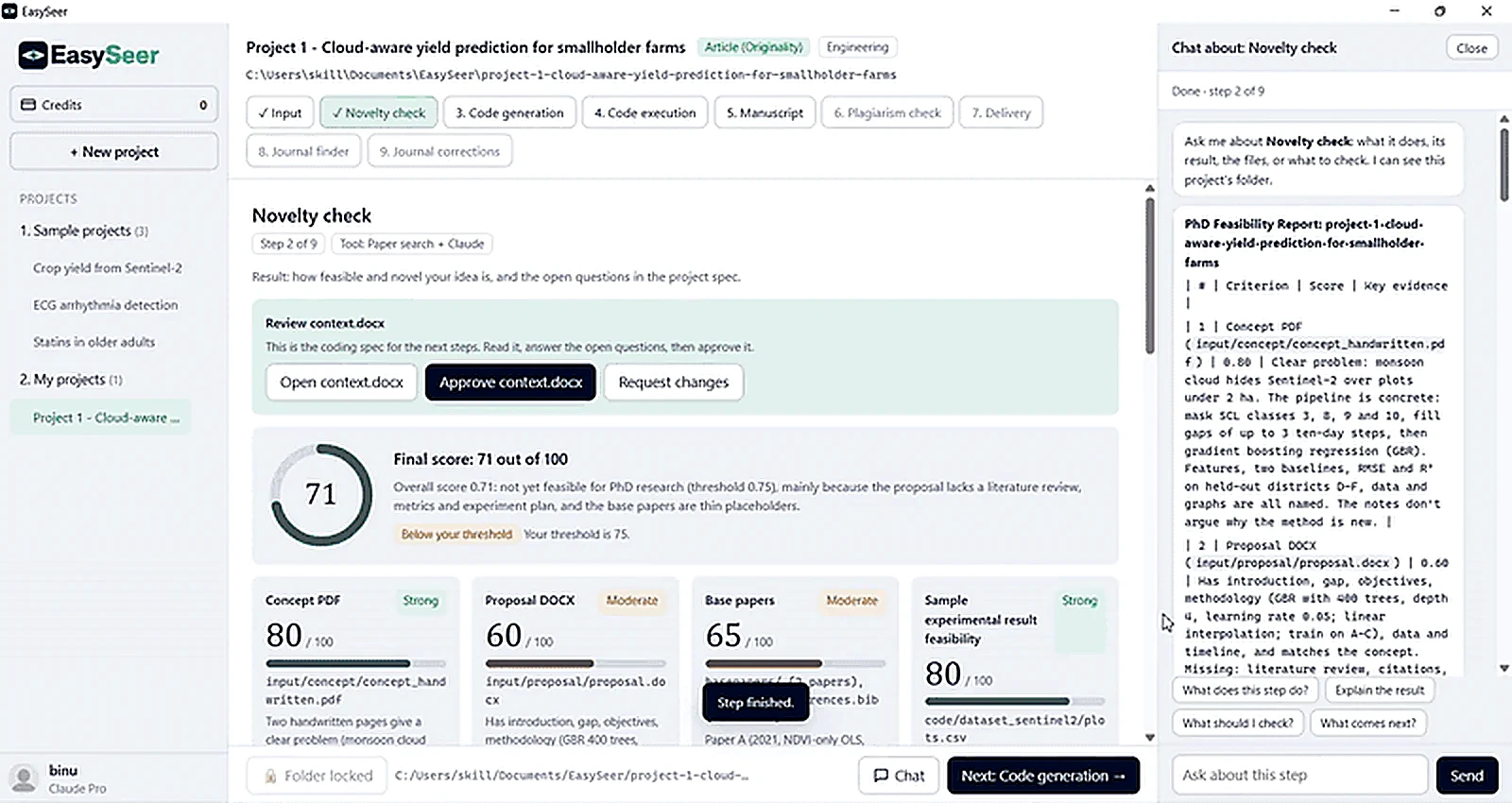
EasySeer reads your handwritten or typed concept, searches papers, scores the idea out of 100 against your own threshold, and drafts the project spec that every later step builds on. You decide whether to approve, change or stop.
- Step
- 2 of 6
- Tool
- Paper search + Claude
- Runs in
- Your Claude session
- Time
- Runs in the background; you can leave the page
What you see in the tool
- A live progress list: locate the project folder, find the files, read the content, score each criterion, compute and report, draft context.docx
- A score for the concept, the proposal, the base papers and the sample experimental result, each with a short reason and the file it came from
- A banner showing whether the result is below or above your threshold
- A Review context.docx card: Open, Approve or Request changes
Why this stage matters
Most research time is lost on ideas that were never checked. A scholar writes a concept in a notebook, spends weeks on code and data, and only then learns that the problem is already solved, or that the idea is too thin to carry a paper. The concept check moves that discovery to the first hour instead of the third month.
Upload a photo of your handwritten page or type the concept. EasySeer turns it into a structured summary: problem, method idea, expected contribution and data needs.
It then compares that summary with published work and flags overlaps and gaps. You decide whether to continue, refine the idea or stop. Nothing moves forward without your approval.
The check is a decision aid, not a verdict. Novelty is judged by editors and reviewers, and EasySeer does not claim to guarantee it.
How it works
Read the concept
EasySeer reads your handwritten pages or typed notes and rewrites them as a structured summary: problem, gap, method idea, data and expected contribution.
Confirm the reading
You correct any misread word, symbol or equation, so the whole workflow starts from what you actually meant.
Score the project
EasySeer scores the concept, the proposal, the base papers and the planned experiment, and explains each score in plain words.
Open questions
It lists what is missing: a literature gap, a metric, a baseline, a dataset detail. You answer them or accept the risk.
Approve or refine
You approve the project specification, ask for changes, or stop. Nothing moves on without your approval.
What you give it
- Handwritten concept pages (photo or PDF) or typed notes
- Optional proposal document
- Optional base papers and references
- Your discipline and paper type
What you get
- A structured concept summary you can edit
- A feasibility score with reasons for each part
- A list of overlaps with published work and open questions
- An approved project specification used by every later stage
What you must check
- Read every score and decide whether you agree
- Discuss the overlap notes with your supervisor
- Search the literature yourself before you claim novelty
Honest limits
- A high score is not proof of novelty. Editors and reviewers judge novelty, not software.
- A low score is not a verdict either. It tells you where the idea is weak so you can strengthen it.
- EasySeer cannot see unpublished work, so overlaps with it will not be flagged.
Questions about this stage
Can EasySeer read my handwriting?
It reads clear handwriting from a good photo or PDF and shows you the text it read, so you can correct mistakes before anything else happens.
What does the feasibility score mean?
It rates how ready the concept, proposal, base papers and planned experiment are for a PhD-level paper, with reasons. It is a decision aid, not a prediction of acceptance.
Can I run the check again?
Yes. Edit the concept, answer the open questions and run it again until you are satisfied.
On the blog: How to check if your research idea is novel before you write the paper (8 min read)
On the blog: How to write a research concept note: structure, length and example (5 min read)
Related guides
- How to upload a handwritten concept: Photograph or scan your handwritten page in good light, add it as the handwritten concept in the Input step, p…
- How to run the novelty check: Set how many related papers to screen and the score you need, press Run novelty check, read the scores, open c…
Make your first project See it in the tour All features
Last updated 2026-11-09. EasySeer is AI. It creates only an initial draft from the novel concept you provide, and it is designed to follow academic ethical guidelines.