
Knowledge base
How can we help you use EasySeer?
Step-by-step guides for every stage, how to read your scores, code and results, what to do when something stops, and a glossary. Start with “How to make one project”.
21 articles
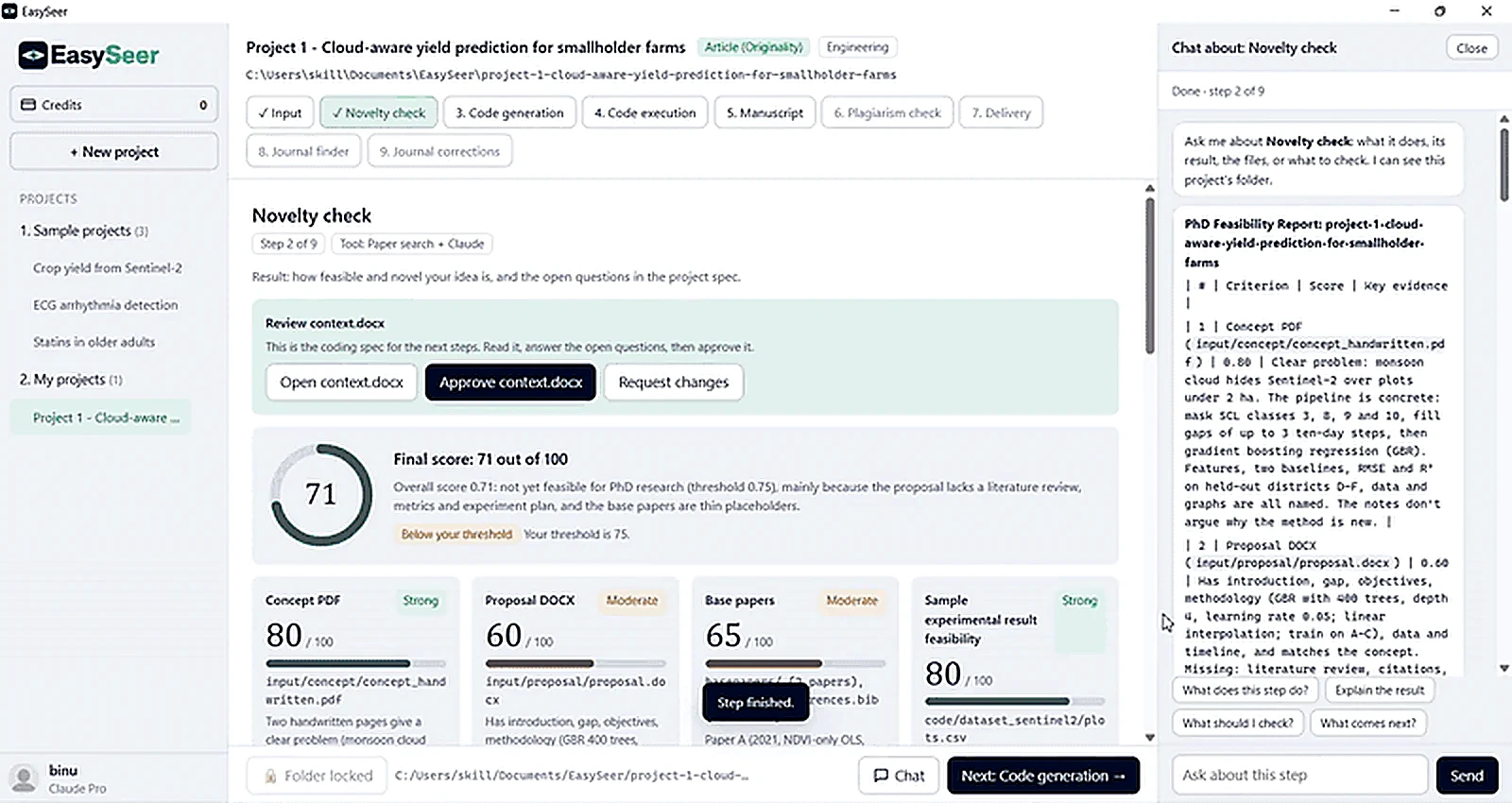 Start here · 2 min readHow to make one project, step by stepA project takes a handwritten concept to a first manuscript draft in six steps: Input, Novelty check, Code generation, Code execution, Manuscript and Delivery. You create an account, connect your own Claude subscription, buy a credit, create a project, and then follow the real screens below.Open the walkthrough →
Getting started
Set up your account, credits and first project.
How to upload a handwritten concept
Photograph or scan your handwritten page in good light, add it as the handwritten concept in the Input step, press Read inputs, then check t…
Read guide → 2 min readHow to prepare your inputs
Only the handwritten concept is required. Add a proposal, base papers and datasets if you have them: the more EasySeer can read, the better …
Read guide → 2 min readCredits and projects explained
One credit runs one project. A credit costs $100 worldwide (Rs 10,000 in India), is used when you create the project, and never expires.
Read guide → 2 min readCreate an account and sign in
Choose Create an account, enter your name, email, role and a password of at least 6 characters, accept the Terms and Privacy Policy, and typ…
Read guide → 2 min readConnect your Claude account
Open the connection page, press Open Claude, sign in with the Claude account you pay for, copy the one-time code Claude shows, paste it into…
Read guide → 2 min readA tour of the EasySeer window
The window has a sidebar on the left, the current page in the centre, a dock along the bottom of a project and a right rail with your checkl…
Read guide →Stage by stage
How to run each step of the workflow.
How to run the novelty check
Set how many related papers to screen and the score you need, press Run novelty check, read the scores, open context.docx and answer the ope…
Read guide → 2 min readHow to generate and run the code
Generate code from the approved context.docx (Step 3), read it, then run it on your own computer (Step 4). Check the graphs and tables caref…
Read guide → 2 min readHow to draft a manuscript
Choose the IEEE mode and tone, choose what to include, press Write manuscript, confirm that you have checked your results, then read the dra…
Read guide → 2 min readHow to use the chat panel
Press Chat on any step to ask about it. The chat knows the current step and your project folder, and offers one-tap questions: what does thi…
Read guide → 2 min readHow to set up your manuscript
Before EasySeer writes the manuscript you choose the IEEE mode (Journal or Conference) and the tone (Formal, or Plain and direct), and decid…
Read guide →Understand your results
Read scores, code, results and terms with confidence.
How to read your novelty score
The novelty check scores your concept, proposal, base papers and a sample experimental result out of 100, each with a reason, then combines …
Read guide → 2 min readHow to read the generated code and results
Code generation shows how many files and Python modules were written and lets you open each one. Code execution shows the graphs, result tab…
Read guide → 2 min readEthics and AI disclosure
EasySeer creates only a first draft from your concept. You stay the author: verify every result and reference, rewrite in your own words, an…
Read guide → 2 min readEasySeer glossary
Plain-language meanings of the terms you see in EasySeer, from base papers to context.docx.
Read guide → 2 min readAccount, Usage, System utilization and Settings
Open them from the profile button at the bottom of the sidebar. Account holds your profile, Claude connection and billing; Usage shows your …
Read guide → 2 min readYour project folder and the folder lock
Every project lives in one folder on your computer, by default under Documents\EasySeer. Starting the Manuscript step locks the inputs and f…
Read guide → 2 min readWhat is available now and what is coming soon
In version 1.0.0 the Article (Originality) project in the Engineering style is available with all six steps. Other styles, literature review…
Read guide →Troubleshooting
What to do when a step stops or fails.
How to resume an interrupted step
If a step started and did not finish, a banner offers Continue, which picks up where it stopped in the same Claude conversation, or Start ov…
Read guide → 2 min readWhat to do when a project fails
Open the step's log, ask the chat what went wrong, fix the input or code if you can, and use Continue or Start over. If the project fails fo…
Read guide →No guides match that search. Try a shorter word, or browse the Help centre.
Help centre and FAQ
Account, payment, files, installation and privacy.
Account and sign-in
Sign up with your name, email, role and a password of at least 6 characters, then type the 6-digit code we email you. If…
Read answer →HelpCredits and payment
One credit runs one project. A credit costs $100 worldwide, or Rs 10,000 in India with taxes included, and never expires…
Read answer →HelpA project failed
If a run stops, read the error card, check your Claude plan limits on the Usage page and your internet connection, then …
Read answer →HelpSupported files
Concept: JPG, PNG, PDF, HEIC, BMP, TIFF, WEBP, DOCX, DOC, ODT, RTF, TXT and MD. Proposal and baseline papers: PDF, DOCX,…
Read answer →HelpInstall the Windows tool
Download the Windows installer from the Download page and run it. If Windows shows a security prompt, check the publishe…
Read answer →HelpYour data and privacy
Your project files stay in the project folder on your computer. Claude reads the files it needs through your own Claude …
Read answer →HelpThe window opens blank
On Windows 10 the Microsoft Edge WebView2 Runtime may be missing. Install Microsoft's Evergreen WebView2 Runtime and res…
Read answer →Help"Connect Claude first" when running a step
Your Claude session is not connected or has expired. Open Account, Claude, Set up connection, then press Check connectio…
Read answer →HelpCode generation is locked
Code generation unlocks only after you approve context.docx. Open the Novelty check, answer the open questions and press…
Read answer →HelpCode execution cannot install packages
Python 3 is missing or not on PATH, or a pinned package version is unavailable. Install Python 3 with Add python.exe to …
Read answer →HelpNo compiled IEEE PDF in the delivery package
No LaTeX engine was found. Install MiKTeX or TeX Live and build the delivery again, or compile the delivered LaTeX sourc…
Read answer →HelpRazorpay does not open or credits are missing
Check your internet connection and firewall for checkout.razorpay.com and try again. If you paid but see no credits, wai…
Read answer → FAQFrequently asked questions
Twenty short answers on ethics, pricing, credits, refunds and data.
Open the FAQ →Last updated 2026-11-09. EasySeer is AI. It creates only an initial draft from the novel concept you provide, and it is designed to follow academic ethical guidelines.